
Lost your phone around your house again? How many times a week do you say (or think) that?
Google Find My Device to the Rescue
Google Find My Device can locate any of your Android devices: phone or tablet.
Open Google Find My Device on a Computer
From any PC, open Chrome and log into your Google account. Search for “Google Find My Device” or type Google.com/Android/Find in the URL search bar. Google Find My Device will open, showing a map with the approximate location of the selected device. You can zoom in to see a large circle around its location.
Your Phone Must Be Turned On
If your phone is not turned on, Find My Device will tell you when it was last “seen” by the Maps Timeline. Mine knew when I had left my house, where and when I had shopped for groceries, then returned home. But… if I had turned off my phone, the process would have stopped there.
All Your Android Devices
All your current Android devices will show as tabs in the top left Navigation Pane. Mine shows my tablet and my phone. I clicked on my phone, and several options are available.
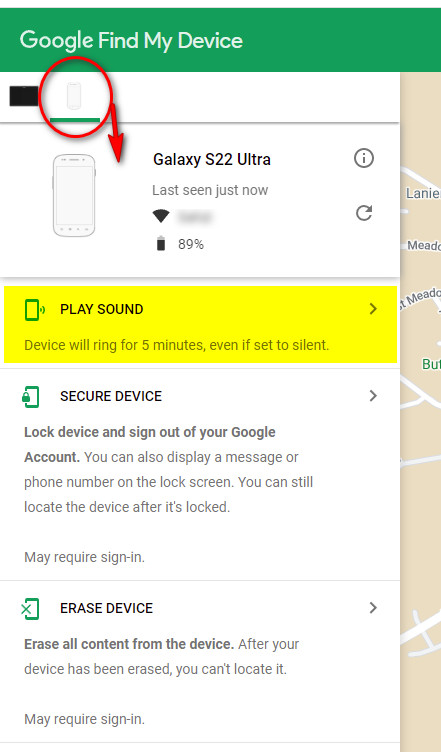
Ring Your Missing Phone for Five Minutes
Click on “PLAY SOUND,” and your device will ring for five minutes even if set to silent. It will stop ringing when you pick it up.
Good News / Bad News
The good: Google ALWAYS knows where your phone is. The bad: Google ALWAYS knows where your phone is.

 Helpful Office Tips
I want an app on this laptop for ‘find my phone’ so I do not need to type in the entire web site….
LikeLike
You can bookmark the page on your Chrome bookmarks. Or you can drag the site to your desktop: hover your mouse over the icon just to the left of the URL, then drag the icon to your desktop.
LikeLike